Chinese-English Wedding Invitations: One Face or Two Sides?
Put English and Chinese on one face when both fit at a readable size. Use English on the front and Chinese on the reverse when the wording needs more room. In either layout, names, dates, times, addresses and RSVP instructions must match across languages; label tea ceremony details separately when the event differs.
Compare the actual template layouts
See how the two options use space before you choose. These are Double Joy samples with fictional names.
- One bilingual face: one invitation page plus the details and tea ceremony cards. Three PDF pages in total.
- English front + Chinese reverse: two invitation faces plus the same supporting cards. Four PDF pages in total.
For double-sided printing, confirm the front/reverse pairing and paper orientation with your printer.
A sample and checking guide. No email or account required.
Watch a real edit and PDF export
View the US$12 digital kit before applicable taxes
Verified in desktop Chrome on a Mac. Manual Save/Open draft. Enter and proofread both languages yourself.
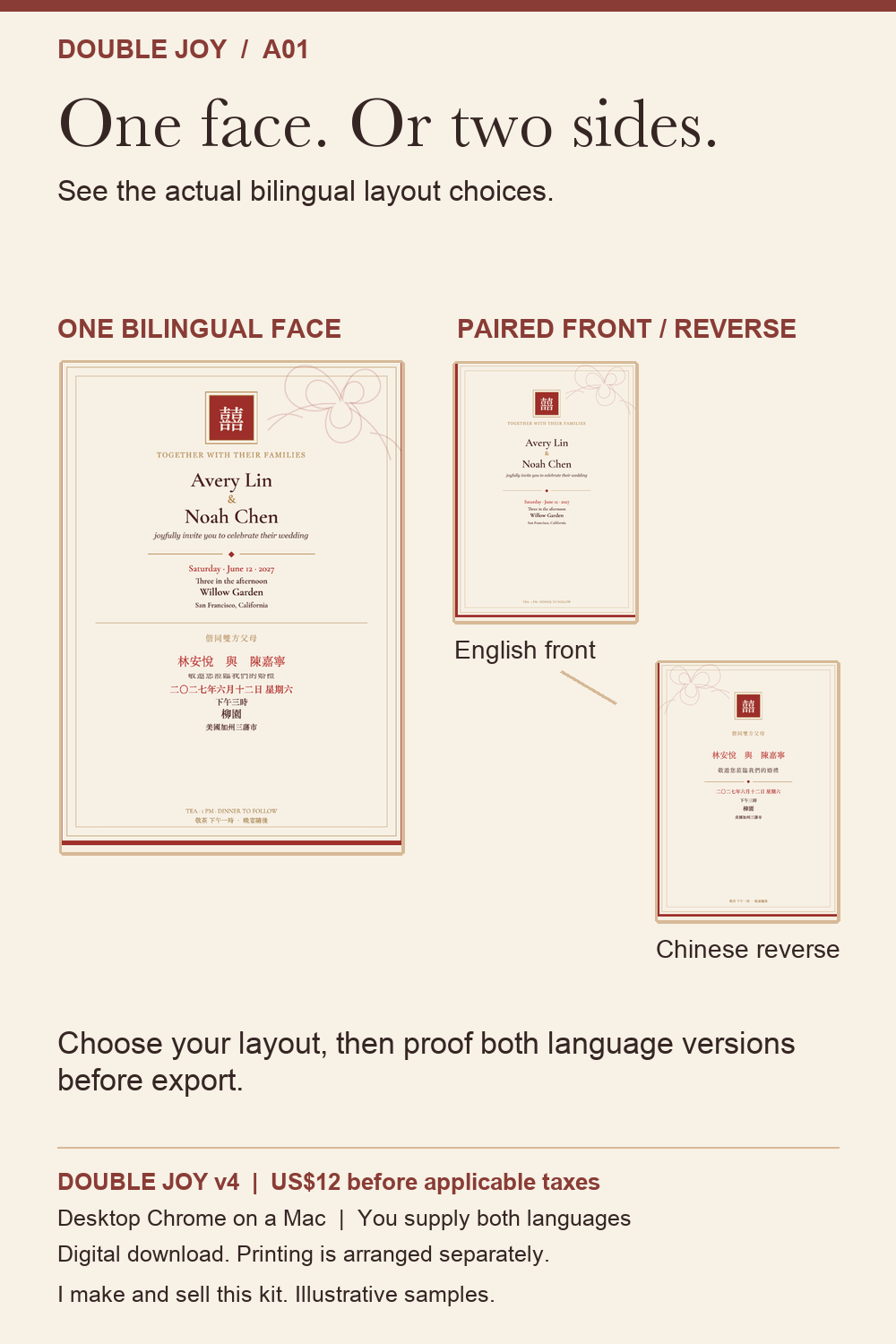
One card, two sides, or separate versions?
• Both languages on one side work when the wording is short and both languages deserve equal prominence. Keep each language in a clear block rather than alternating every sentence.
• One language on each side gives longer wording more room. Make the reverse obvious; otherwise a guest may never see the second language.
• Separate language versions make sense when guest groups need substantially different wording. They are harder to maintain: a changed venue or start time must be corrected in every version.
None is universally best. Start with what a guest needs to do after reading, then choose the least complicated layout that makes those actions clear.
Compare the three approaches
| Layout | When it helps | What to check |
|---|---|---|
| One bilingual face | Short wording and equal prominence for both languages | Readable size and clear separation of language blocks |
| English front, Chinese reverse | Longer wording needs more space | Guests know to turn the card over; both faces match |
| Separate versions | Guest groups need substantially different wording | Every version is corrected when an event fact changes |
A worked example: short invitation, separate event details
For a celebration at 18:00 and a tea ceremony at 14:00, put the celebration’s own name, date, start time and venue together in each language on the invitation. Put the tea ceremony’s separate facts on its labeled card. A details card can say “arrive at 17:30; celebration starts at 18:00” without creating a contradiction.
Choose one bilingual face if those two invitation blocks remain comfortable to read in the exported 5 × 7 inch file. Choose front and reverse if fitting both forces cramped lines or smaller text than you can comfortably read. A fixed word count cannot decide this: Chinese and English text, typeface and spacing take different amounts of room.
Try the complete English and Chinese wording examples for all three cards, then use the free date and time checker. It catches a Chinese tea ceremony entry of 18:00 against a master tea ceremony time of 14:00; it does not mistake the invitation’s correct 18:00 for the tea ceremony time.
What the two layouts export in Double Joy
One bilingual invitation face produces a three-page PDF set: invitation, details and tea ceremony. English front and Chinese reverse produce four pages: two invitation faces plus the two supporting cards. This describes our kit; other tools may export differently. The actual Mac export recording shows the three-page output. Confirm front/reverse pairing with your printer before ordering.
Keep one master list of facts
Before styling the card, write down the names, date, ceremony start time, venue and address, RSVP method and deadline, and any arrival or dress guidance. Compare every fact across the Chinese and English wording. If the tea ceremony and main celebration have different times or locations, label those events separately.
Decide what belongs on the invitation and what can move to a details or tea-ceremony card. The main card should still tell guests which event they are invited to, when and where it happens, and where to find the next instruction.
Proof the file guests will actually receive
Have someone fluent in each language check the wording and names. Then inspect the exported PDF at its intended physical size. Look for missing Chinese characters, crowded lines, shifted punctuation, inconsistent times and an RSVP link that does not work. If you will use a printer, ask that printer about trim, bleed and safe margins, and review a physical proof when possible. A screen preview is not a printed sample.
I created Double Joy — Chinese-English Wedding Set for couples who want to self-edit one coordinated invitation, details card and tea-ceremony card, then export a personalized 5 × 7 inch PDF. The verified editing environment is macOS desktop Chrome. It is a digital kit, not a translation or proofreading service, a physical printing service, or a physical print proof. Local Save draft and Open draft are included. A mobile editing workflow has not been verified. If you need those services, choose a provider that explicitly offers them.
The right bilingual invitation is not the one that fits the most words. It is the one that leaves every guest with the correct details and a clear next step.
Check the front and reverse before printing
Ask your printer which exported pages should form a front-and-back pair and how the paper will be flipped. Keep the orientation and margins consistent, and review a physical proof before ordering a batch. Double Joy has not undergone a physical print test.
See the artwork and an actual PDF export
Open the free two-page artwork and date-change checklist. It is a sample guide, not the full editable kit.
Watch the real edit-and-export demonstration. The recording is condensed and does not promise that a complete invitation takes seconds.
Use the PDF proofing checklist after choosing your layout.
Product links point to our own Double Joy kit. These checks also work with other invitation tools; purchase is not required.
Follow the Mac editing walkthrough and watch the actual PDF export.