Choose the room your wording needs.
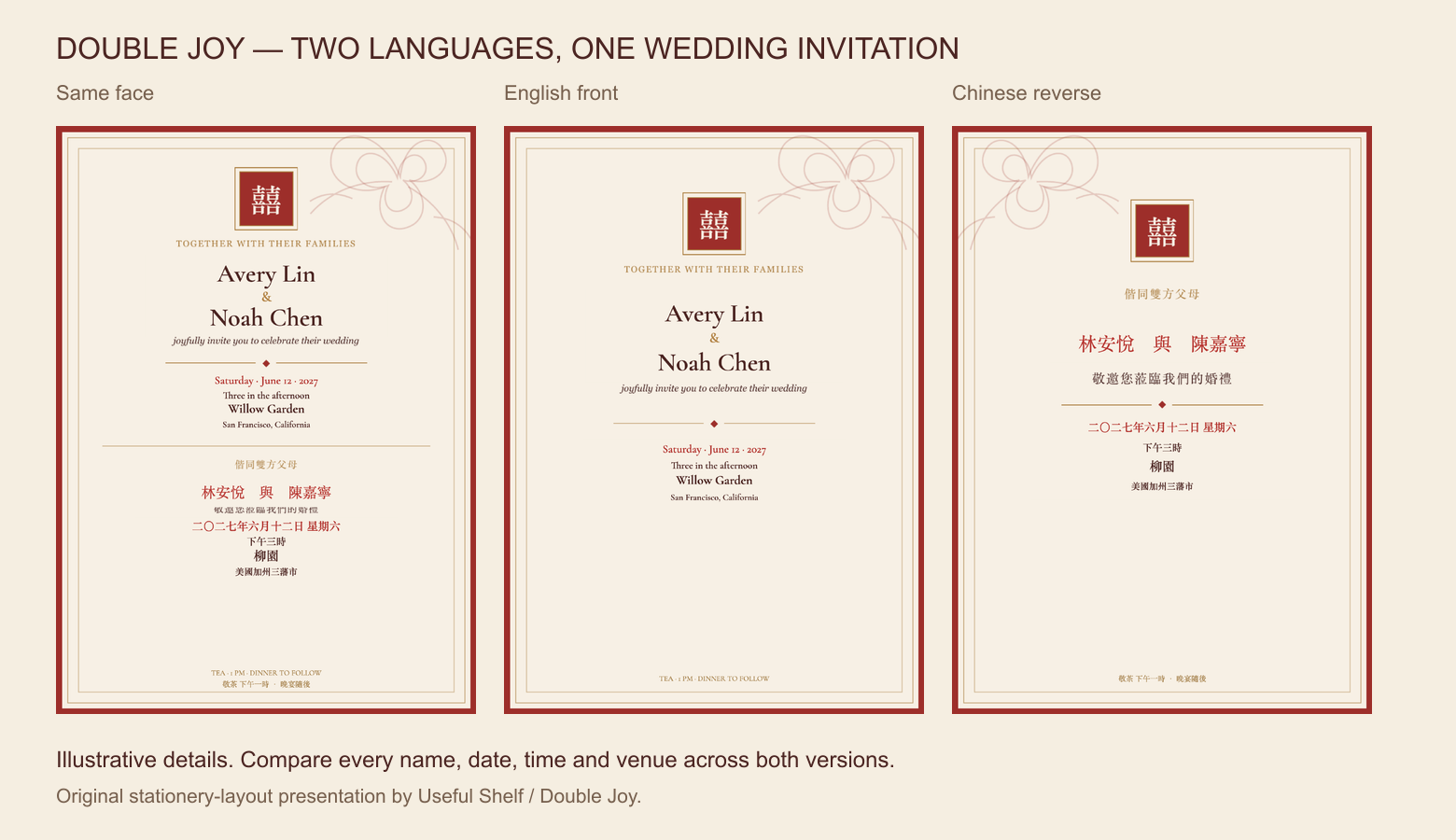
Keep both languages on one face, or give English and Chinese their own sides. Compare your complete wording at the intended size.
Compare the actual layoutsChinese-English wedding invitation kit
Start with a Chinese-English layout, then add your wedding details. A matching invitation, details card and tea ceremony card in one self-edit download.
You enter and proofread both languages. No editor account is needed. Save your editable JSON draft before closing.
See what you are buying
Keep both languages on one face, or give English and Chinese their own sides. Compare your complete wording at the intended size.
Compare the actual layoutsWatch the current v4 Save draft, change and Open draft sequence. The silent demonstration uses actual UI captures with pauses shortened; it is not a completion-time promise.
Check the Mac workflow before buying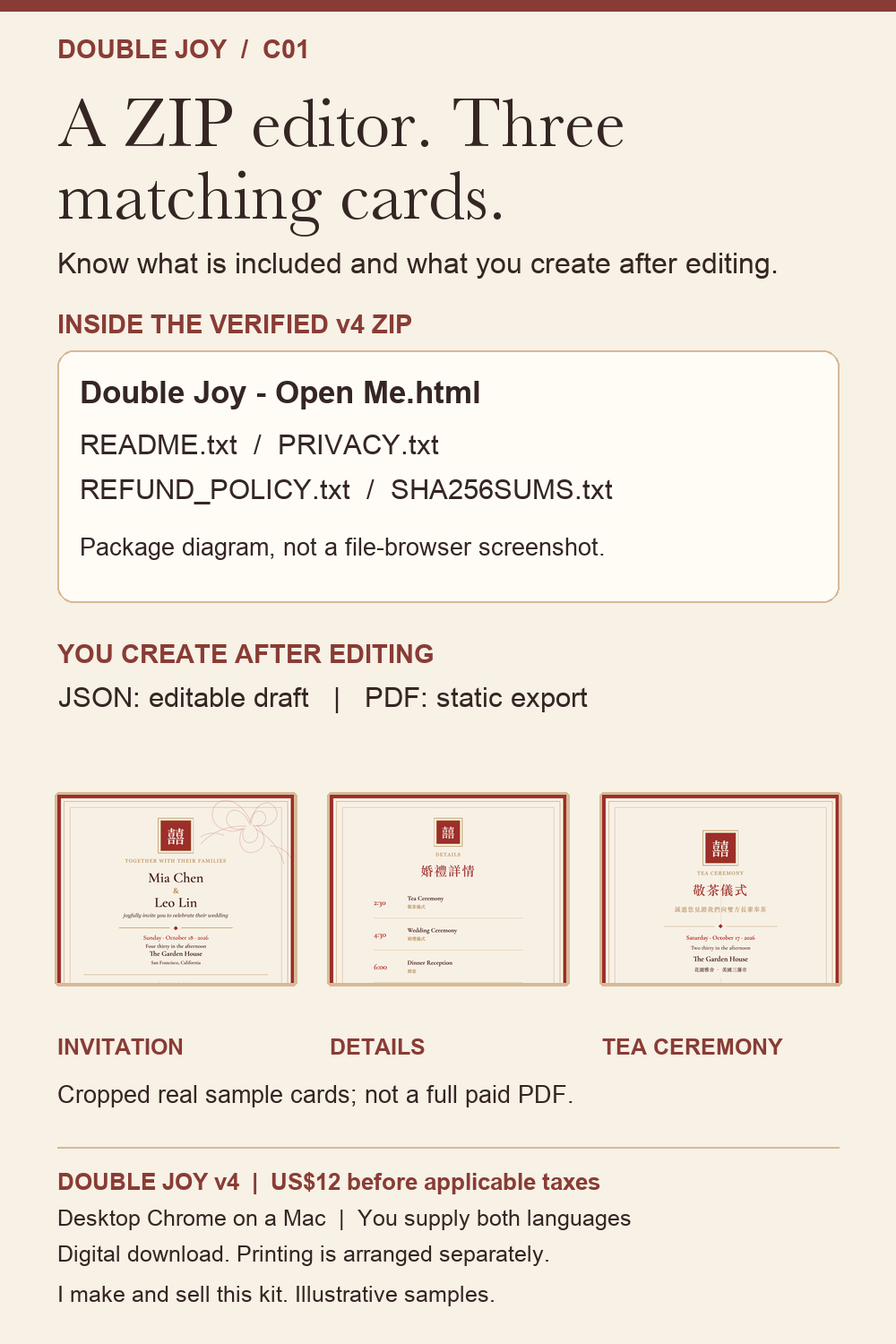
The offline HTML editor and quick-start instructions cover invitation, details and tea ceremony cards. Export three or four 5 x 7 inch PDF pages, depending on the invitation layout.
Inspect the free sample and checklistBefore applicable taxes. You supply the wording and arrange printing. Published by Useful Shelf, seller and creator of Double Joy.
Inside the download
Keep the set in one visual style while giving each event its own facts. Choose traditional or simplified Chinese artwork, then type the wording you have checked.
The ZIP includes an offline HTML editor and quick-start instructions. Unzip it and open “Double Joy - Open Me.html” in desktop Chrome on your Mac. No editor account or installer is required.
Choose your editable set
Double Joy includes the invitation, details card and tea ceremony card together for US$12 before applicable taxes. You edit the English and Chinese wording yourself in an offline HTML editor. No Canva account, design subscription or separate tea-card purchase is needed for this kit.
| Your requirement | What this kit provides |
|---|---|
| One matching three-card set | Invitation, details and tea ceremony cards in the same download; 5 × 7 inch PDF output. |
| Bilingual layout choice | Both languages on one invitation face, or English front and Chinese reverse. You enter each language separately. |
| Editing on a Mac | Desktop Chrome on a Mac is verified. Watch the actual edit and export below; Windows, phones and other browsers are unverified. |
| Work without an editor account | Unzip the download and open the HTML editor locally. Use Save draft before closing and Open draft to continue editing later. |
| Translation or printing included | Neither is included. You supply checked wording and arrange printing. The kit does not convert lunar dates or typed Chinese characters. |
Local editable draft save/open is included. Mobile editing, professional translation and a printing service are outside the verified scope. Before buying any template, check the actual included-file list: a matching collection does not necessarily mean every card is included in one price.
Inspect the free sample PDF · View the three-card kit and purchase terms
This is our own product comparison checklist, published by Useful Shelf, the seller of Double Joy.
From wording to PDF
Use one face when both languages fit comfortably. Use front and reverse when the wording needs more room.
Compare names, dates, times, addresses and RSVP instructions with one event note. Keep tea ceremony details separate when they differ.
Save the PDF, reopen every page, and inspect the actual file. Check your printer’s requirements before ordering prints.
12-second silent sequence of actual v4 UI captures: save a JSON draft, change the names, then reopen that draft. Pauses are shortened; sample names, venues and dates are illustrative. This is not a promise that a complete invitation takes seconds.
The editable JSON file is saved, the names are changed, and Open draft restores the saved names. The six current v4 demonstrations below also show dates, RSVP, separate tea-ceremony details and PDF export.
You supply both languages. The editor does not translate wording. Traditional and simplified Chinese artwork choices do not convert the text you type.
| Invitation layout | Set output |
|---|---|
| English and Chinese on one face | 3 pages: invitation, details, tea ceremony |
| English front, Chinese reverse | 4 pages: two invitation faces, details, tea ceremony |
Output is 5 × 7 inches. The verified editor environment is desktop Chrome on a Mac. Save an editable JSON draft before closing or reloading. Open draft restores it; PDFs are for printing and cannot be imported as drafts.
Inspect the free two-page sample PDF · Read the complete Mac walkthrough · Check the exported file
The sample is a free guide, not the full editable kit. For physical stationery, confirm trim, bleed, color and front/reverse pairing with your printer. No physical print test is claimed.
Free planning guides
Prepare the wording, choose a readable bilingual layout, keep an editable draft, then approve the exported file. Each guide answers a different part of that process; the free checks do not require buying the kit.
Use original English and Chinese invitation, details and tea ceremony examples. Compare each event's date and time with the free checker before styling.
Choose a layout by the actual wording and readable space. Check which pages form the invitation's front and reverse.
Understand the offline HTML editor, the JSON draft you save yourself, and the static PDF you export. See the real v4 reopened-draft example.
Check the actual 5 × 7 inch page size, record approved filenames, and keep printer requirements separate from screen checks.
Before you buy
Yes. Put both languages on one invitation face, or use English on the front and Chinese on the reverse. The matching set exports three or four pages, depending on your choice.
No. You supply and proofread both languages. Artwork choices do not translate typed text, convert characters or convert lunar dates.
Desktop Google Chrome on a Mac is the verified editing environment. Windows, mobile devices and other browsers have not been verified for this version.
Edit in the offline HTML editor, then export again. The output is a static raster PDF, not a fillable form or an Acrobat-editable text template. Keep the JSON draft to resume editing. The three-file guide explains what to save.
Yes. Save draft downloads an editable JSON file. Open draft restores names, wording, event details and layout. There is no autosave: save again after edits. An exported PDF cannot be imported as a draft.
No. This is a digital kit. Physical stationery, printing, translation, custom design, guest-list management and QR generation are not included. Chinese text uses your computer’s fonts. No physical print test has been performed; ask your printer about bleed, trimming, color and front/reverse alignment.
Except where applicable law requires otherwise, change-of-mind refunds are not offered after digital delivery. Verified duplicate charges are refunded. Report missing, corrupt or nonconforming files to Useful Shelf within 7 calendar days. This is a technical-problem reporting period, not a free trial. See the full Refund Policy for the remedy process. Mandatory consumer rights remain available.
Free before-you-buy worksheet
Our existing six-entry worksheet compares English and Chinese dates and times across the invitation, details card and tea ceremony card. Use a separate agreed record when the tea ceremony is on another date.
Open the free event checker · Read the worked wording examples
No account or purchase needed. This worksheet does not scan PDFs, translate wording or convert calendars.
Recorded from the current download
These are condensed captures of actual local editor actions. They are silent step demonstrations with shortened pauses; example names and events are illustrative. The PDF was downloaded and independently checked: four pages, each 5 × 7 inches. No physical print test is claimed.
Get the US$12 digital kit View the watermarked v4 sample without signing up